Articles by "Printer Canon"

Showing posts with label Printer Canon. Show all posts

PIXMA Ink Efficient G-Series, the New Generation Super Quality Printer with Tank System Bottle Efficient


The need to print text documents and photographs in large quantities but still economical in terms of cost, have led the trend of printing with bertangki printer ink bottle that can be refilled. Responding to the challenge, presenting Canon PIXMA Ink Efficient G-series ink tank design with large capacity bottles, easily replenished, efficient, and capable of printing with excellent quality results. PIXMA Ink Efficient G-Series consists of three models, the G1000 single function printers, multifunction printers and wireless multifunction G2000 G3000.
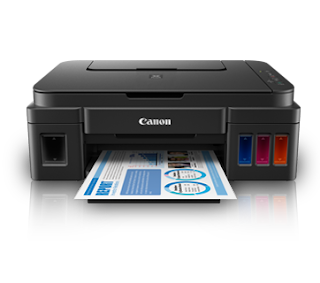
Printer PIXMA G2000


Prima Print Quality and Print Capabilities Borderless

Economy printing with G-series printer is supported by Canon genuine ink bottle sized to be satisfactory for the use of printers in the home and home-office, which is able to print more than 6,000 pages of documents in black and white and 7000 pages in full color. has the advantages of the G-series printers are able to print a 4R photo in full size (borderless) only the period of 1 minute, and can also be used to print an A4 size photo.

PIXMA Ink Efficient G-series show that the hybrid ink system Canon's newest, combines a black pigment ink and color dye to print a stunning photos with the photo paper, as well as text documents with sharp black ink.

Ink Tank Refill Bottle with Ease

Canon PIXMA printer G-series is not only efficient in terms of ink, but also in terms of design. Canon made a tank that can refill a conventional printer with integrated ink tank that is transparent to the body of the printer. PIXMA Ink Efficient G-series has a form that is more compact than other printers that also has a large ink tank. As a result, PIXMA Ink Efficient G-series does not need a place that is too big and allow users to see the volume of ink remaining.

Understanding the possibility of ink remaining unused after recharging, Canon designed the PIXMA ink bottle cover G-series which can prevent ink leakage. The tip of the ink bottle is also designed to ensure easy flow of ink when refilling and prevent ink splash and mess.

Supports Use of Wireless

For wireless use at home or office, the PIXMA Ink Efficient G3000 is equipped with the ability to print from the cloud and mobile services. Thus, print documents and photos wirelessly from smartphones, tablets and laptops too easy and practical. If you want to print wirelessly without having to download software simply use Canon Print Service on Android or Apple Airprint feature on iOS-based perangka. This printer can also be used for Google Cloud Print, so it even easier to print anywhere and anytime.

Compability System :
Windows 10  (32bit - 64bit)
Windows 8.1 (32bit - 64bit)
Windows 8 (32bit - 64bit)
Windows 7 (32bit - 64bit)
Windows Vista (32bit - 64bit)
Windows XP

Detail Software and Support Driver
name :  win-g2000-1_0-mcd.exe
size :  49,196KB

Download 


Driver Printer PIXMA G2000 ALL Windows

 What is the Canon PIXMA MG7550?


The PIXMA MG7550 is Canon's new top-of-the-range all-in-one. Created for the home and photography customer, it offers five-colour, duplex print on document or CD/DVD blanks and can be cabled to a desktop or associated to a number of mobile devices.
Canon PIXMA MG7550 - Design and Functions

Available in black, white and, uniquely, burnt orange, you can observe how the Canon PIXMA MG7550 has developed from the original 'lacquered box' design of the company's PIXMA all-in-ones of a few years ago. Typically the sloped front panel has brought the place of the complete scanner lid encircle seen on earlier models, but gives plenty of room for both the 8. 8cm touchscreen and a number of dedicated touch control keys, which light up when needed.

CANON PIXMA MG7770 NEW

CANON PIXMA MG7770 NEW

elow the controls, the whole front panel folds down to get part of the output tray, and a secondary support swings away automatically from its entrance edge. However, the 3 rd stage must be pulled away by hand and has no end-stop, so pages sometimes conclude quite untidily stacked.

Below the output tray are two reserved paper trays: one for a meagre 125 sheets of plain paper and the other for 20 image blanks up to 13 x 18cm. Is actually a clever arrangement and there's a slot above which takes a CD/DVD carrier, trapped in a clip under the image dish.
Canon PIXMA MG7550 - Connections and Installation
CANON PIXMA MG7770 NEW

In the left-hand edge of the front panel, inside the front cover, are twin SD and MemoryStick slots, although there's no USB socket. There's one at the back for connection to a computer, though wireless is the more versatile option. Typically the printer is compatible with AirPrint, Wi-Fi Direct and Canon's own print service, PIXMA Cloud Link.

Typically the printer also has NFC (near-field communication) wireless technology. Touch an NFC-enabled capsule or smartphone to the small cross at the end of the PIXMA MG7550's control panel and details of the printing device should be added into the device's print listing. Sadly, the Samsung Galaxy phone we tested it with threw up an 'unidentified tag' error.


Compability System :
Windows 10  (32bit - 64bit)
Windows 8.1 (32bit - 64bit)
Windows 8 (32bit - 64bit)
Windows 7 (32bit - 64bit)
Windows Vista (32bit - 64bit)
Windows XP

Detail Software and Support Driver
name :  win-mg7700-1_0-mcd.exe
size : 49,340KB

Download 


CANON PIXMA MG7770 NEW (ALL Windows) Package


The particular MG3670 measures 5. nine by 18 by 16. 6 inches (HWD) and weighs 13 pounds thirteen ounces. Basic MFP features are limited to publishing, scanning, and copying. Will be certainly no USB Type A new port or memory credit card slot, which means you can't print from a USB key, a PictBridge camera more than a USB cable connection, or a memory card. However, like most other recent Canon Pixma models, the printer supports Wi-fi PictBridge, which Canon claims is available on all of its recent camera models that provide Wi-Fi. This isn't available on any cameras from other manufacturers.

Beyond the basics, the MG3670 offers mobile printing and scanning, as well as the ability to print from selected websites. Connect it to your network using Wi-Fi, and you could both print from and scan to iOS, Android, and Windows phones and tablets through an access point on your network. You can also print through the cloud, supposing your network is linked to the Internet, and you may use the Canon Print out App on your cell phone or tablet to send print jobs directly to the printer from various websites, including Dropbox, Search engines Drive, Facebook, Twitter, and more.
Canon MG3670

Canon MG3670


If you hook up the MG3670 to a PC via USB cable connection, you won't be able to print through the cloud or print immediately from websites, but you can still print from and scan to mobile devices by connecting immediately to the printer using Canon's equivalent to Wi fi Direct.

Paper handling moves a feeling beyond the basics, with an automated duplexer. Paper capacity is one hundred sheets, which is sufficient for most personal use. For scanning, there's a letter-size flatbed, but no ADF.

Compability System :
Windows 10  (32bit - 64bit)
Windows 8.1 (32bit - 64bit)
Windows 8 (32bit - 64bit)
Windows 7 (32bit - 64bit)
Windows Vista (32bit - 64bit)
Windows XP

Detail Software and Support Driver
name : win-mg2500s-2_1-acd.exe
size : 48 MB

Download :


Driver Canon MG3670

 Now no need to hesitate anymore to print documents in large quantities, because Canon presents Canon PIXMA Ink Efficient E400. Where two new printer series is able to provide excellent print quality and more efficient in the use of ink .


 Canon Pixma E400

 Canon Pixma E400


For those who want to print more with a selection of more affordable price of the printer, the Canon PIXMA Ink Efficient E400 is the solution. This printer can print up to 400 pages for black and white documents (PG-47) and 300 pages for color documents of A4 (PG-57). While Canon PIXMA Ink Efficient E560 can print up to 800 pages for black ink (PG-89) and 300 pages for color inks (PG-99). Despite scoring a lot, but the printer still has good print quality and great. In addition, the Canon PIXMA E400 and E560 also features Auto Power ON / OFF so that environmentally friendly with less energy consumption. This feature makes the printer automatically turns on when it detects a command to print from a mobile device or PC.


Compability System :
Windows 10  (32bit - 64bit)
Windows 8.1 (32bit - 64bit)
Windows 8 (32bit - 64bit)
Windows 7 (32bit - 64bit)
Windows Vista (32bit - 64bit)
Windows XP

Detail Software and Support Driver
name : win-e400-1_1-acd.exe
size : 47.2 MB

Download

Canon Pixma E400


 Rule is a trusted name among photography enthusiasts. Canon has made some excellent Digital Point & Shoot and DSLR cameras and also manufacturing more and more. Within case of printing, India's most trusted name is HP I guess. They will really build some powerful printers. Canon also has been making many computer printers for many days and many of them are cheap and good.

I bought Canon Pixma E510 from Flipkart 7-8 months ago. This specific was my first rule printer and before that I used a HORSEPOWER one which gave me uninterrupted service for 3-4 years. Some problems happened all in a sudden and I got rid of it as my'paisa' was'vusool' fully. Then I purchased from WSRetail of Flipkart who gave an exchange offer of Rs. 500/- discount for the HORSEPOWER printer. I was happy with the deal.

Canon PIXMA E510

Canon PIXMA E510

Features:


It is an Inkjet multi-function printer(some call them MFD -Multi function device) with Print, Scan. Copy capability. It has Print quality of 4800x1200 dpi, Check resolution of 1200x2400 dpi. Just deals with A4 size papers. A3 and so forth papers are not supported. It can also print Pictures though I have not tested it yet. Front Tray can hold up to 100 sheets. Printing Speed for color paperwork is 5-6 ppm and for black& white it is 9-10 ppm. Copy speed is approx 24-25 second. Scan Speed is approx 15-16 second. So feature wise it is pretty standard for an entry level multi-function printer.

Create Quality:


It comes with polished black color. There is another variant available with Blue-Black dual tone. Anyway, the printer looks cool. Develop quality is good but not just like HP computer printers. On the upper still left corner there is Strength button and under it a 7-segment display is. Some indicators displays exist for A4 plain paper, A4 picture paper, Suit to Page etc. U will also find a dedicated Settings button and Scan button. In the bottom there are buttons for Dark & White or Color copying and a Stop/reset button. All the switches are well positioned and have a good feedback. Front Tray(paper feed) and Output Tray are there and they are fairly folding type. All fittings and ports are in the back side. Following opening the front tray and output tray there is certainly another drawer opening which u can access the Ink Cartridges(Black and Color). All the trays are not so strong for day to day use. It seems they can be broken suddenly although they wont, but the impression of their build quality is not effective. On top, maximum area is occupied by the flatbed Scanner Glass. Reader Glass is covered by the Upper Lid. Overall, ergonomics is very good but build quality is able to reduce your confidence in case of rough use.

Functionality & Performance:


U will of course find a Motorist CD in the package deal. Installing it is simple. After it is installed, a shortcut icon for Canon Quick Menu will be created in the bottom right corner of the desktop. Delete word, oughout can access all the functions of the printer. It has 5 individual tabs - i) Print, ii) Scan, iii) Internet Services, iv) Manual & Device information and iv) device settings. Apart from number iii, all of them are incredibly useful and self explanatory(though initially some of them may be overwhelming).

Print output(whether color or b/w) is Superb for an basic MFD. Blacks are deep and color saturation can be quite good. Its quality is superior than my previous HP MFD. Scanning is also simple and the sought output can be stored in PDF or JPEG format. Here also, the scanned docs or images come out very razor-sharp and clear. U will be more than satisfied with the ultimate results u get from this printer. Copying is also damn easy; put the original on the scanning device bed, cover the cup with the lid and press any of the Color or Black button and u are done. Output great and validated considering its price. We did not check picture printing, but my suppose is the fact will be of pretty nice quality too. The Demo Cartridges(Black-PG88 and Color-CL98) which came with the printer are upward and running till now. So I dont actually know their duty cycle, but I will safely say that till date I have taken at least 180-200 outputs. No Low Tattoo Level warning till now. Also the cartridges are not very pricy.

Summary:

I bought it for approx Rs. 4500/- as far I remember. It is cheap. Quality is its weak point since it is not convincing enough but. the performance is very very good. Another issue which I experienced is, sometimes it gives 'no paper' concept even though the input tray has 2-3 sheets or more. And u have to take proper care so that the printer will not get exposed to too much dust. Dirt can cause trouble to this printer, even some serious one.

My old HP MFD had very good build quality but performance was much substandard to Canon. HP also offers some entry level MFDs with competitive price as well as Brother, Epson etc . So its upwards to u what to choose - performance over build quality or vice versa. Anyway, price-performance percentage of this printer is quite high


Compability System :
Windows 10  (32bit - 64bit)
Windows 8.1 (32bit - 64bit)
Windows 8 (32bit - 64bit)
Windows 7 (32bit - 64bit)
Windows Vista (32bit - 64bit)
Windows XP

Detail Software and Support Driver
name : mp68-win-e510-1_02-ea32_2.exe
size : 25.9 MB


Download 


Driver Canon PIXMA E510

Auto Power On detect the printing command and will automatically mengaktifkanprinter.Menggunakan smartphone or tablet device, users can print documents and images stored on their devices, or scan documents directly to their devices. Available for iOS-based devices and wireless Android.Dengan PictBridge function, you can print photos directly from a camera-featured Wi-Fi. You no longer need a PC cable or USB.Memungkinkan users to print photos, email, web pages and documents wirelessly, without the need to install driver perangkat.Cetak charming photo is clearly up to A3 + size. iP8770 comes with a gray ink for printing monochrome photos with exceptional image detail detail bayangan.Fitur Direct Disc Printing allows you to print labels directly to disc CD DVD / Bluray having a surface that can be printed.

 
Canon Pixma IP 8770

Canon Pixma IP 8770


 Compability System :
Windows 10  (32bit - 64bit)
Windows 8.1 (32bit - 64bit)
Windows 8 (32bit - 64bit)
Windows 7 (32bit - 64bit)
Windows Vista (32bit - 64bit)
Windows XP

Detail Software and Support Driver
name : win-ip8700-1_1-acd.exe
size : 50 MB


Download 

 Driver  Canon Pixma IP 8770

 Comes with a compact and feature-rich, Printer Canon Pixma MX397 All-in-One increases your productivity with the ability to Scan, Copy, Fax, PC Fax in a single device. With its cutting-edge features, Printer Canon Pixma MX397 All-in-One to be the right choice for those who need high productivity printers to support you.


Canon Printer Pixma MX397 All-in-One

Canon Printer Pixma MX397 All-in-One


Optimal Print Quality

 Printer Canon Pixma MX397 All-in-One is supported with a resolution of 4800 x 1200 dpi to ensure optimal print quality. For the ability to print, the printer is able to print faster with 8.7ipm for black and white documents and 5ipm for color. You also can print borderless 4 x 6 with a time of just 46 seconds.

FINE technology 

Printer Canon Pixma MX397 All-in-One has a FINE technology (Full-photolithography Inkjet Nozzle), which increases the production of color are more varied. Not only that, this technology is able to create microscopic ink droplets as small as 2pl to print high-quality images.

Features Fast Front 

With this feature, enables you when replacement ink and paper when printing speed up charging. With innovative design, these problems can be overcome by Fast Front where the cartridges are usually somewhat hidden on multifungi printer and paper tray are easy to reach.

features ADF

 With the feature Automatic Document Feeder (ADF) allows you to make the scan, and copy dozens of pages (up to 35 pages) to be more easily and quickly without having to wait.

Features Fun Filter Effect

 Express your creativity with the Canon Printer Pixma MX397 All-in-One. This feature comes with several special effects to make the mold more unique. For example, the Fish Eye Effect makes the image becomes wider in the middle and distorted. Prints can also be performed in miniature effect so as to make the image smaller subjects. While creating stylish vintage toy camera in the picture, there is also the effect of soft focus that will make the picture becomes a bit blurry and or low sharpness and blur the background to make the main focus of the picture is more dominant than the rear image.

Reduce Energy Consumption and Environmental Preserve 

Reduce energy consumption and conserve resources, save energy with ENERGY STAR qualified. Easily recyclable product packaging is shipped in packaging 99% recyclable.

Compability System :
Windows 10  (32bit - 64bit)
Windows 8.1 (32bit - 64bit)
Windows 8 (32bit - 64bit)
Windows 7 (32bit - 64bit)
Windows Vista (32bit - 64bit)
Windows XP

Detail Software and Support Driver
name : mp68-win-mx390-1_00-ea32.exe
size : 28 MB

Download

Canon Printer Pixma MX397 All-in-One

PIXMA Pro9000 Mark II has the functionality and technology you need for high-quality output so that you can become a photographer you always wanted to be. 8-color ink system widens your color palette along with the advanced Easy-PhotoPrint Pro software to fine tune your prints plus Ambient Light Correction1 which optimizes color output to match your specific lighting conditions will be displayed in. This fantastic printer does all of this and more while supporting Canon Fine Art Photo paper up to 13 "x 19" with two separate paper paths, including front feeder for heavyweight paper types.
Canon PIXMA PRO 9000  Mark II

Canon PIXMA PRO 9000  Mark II 


Compability System :
Windows 10  (32bit - 64bit)
Windows 8.1 (32bit - 64bit)
Windows 8 (32bit - 64bit)
Windows 7 (32bit - 64bit)
Windows Vista (32bit - 64bit)
Windows XP

Detail Software and Support Driver
name :pro9000vst223ea22.exe
size : 10.45 MB

Download 

Driver Canon PIXMA PRO 9000

Comes back to the latest multi featured printer from Canon, specifically, the Canon PIXMA MX492 is well suited for users who want to have a printer with features ranging from Printing, Scan, Copy, until FAX. Not only that, the Canon PIXMA MX492 comes with features ADF (Auto File Feeder) which provides value added which can perform the functions Copy & Scan up to size paper Folio / legal that can accommodate upward to 20 sheets of paper at the same time
Canon Multifunction Inkjet Printer MX497

Canon Multifunction Inkjet Printer MX492


Not only there are the features of both these printers, the Canon PIXMA MX492 is equipped with Wi-Fi so that users can printing directly from a PERSONAL COMPUTER, smartphone, or tablet and never have to use cables. Mode Automobile Power ON / AWAY FROM also has embedded in the printer to be able to allow the setting smart energy, where the printer can automatically turn off when not used and automatically turns on when it picks up a print command from the PC, smartphone or tablet.


Compability System :
Windows 10  (32bit - 64bit)
Windows 8.1 (32bit - 64bit)
Windows 8 (32bit - 64bit)
Windows 7 (32bit - 64bit)
Windows Vista (32bit - 64bit)
Windows XP

Detail Software and Support Driver
name : MX492 series Full Driver & Software Package
size : 50.2 MB

Download 


Canon Multifunction Inkjet Printer MX492

Comes back to the latest multifunction printer from Canon, namely, the Canon PIXMA MX497 is ideal for users who want to have a printer with features ranging from Print, Scan, Copy, until FAX. Not only that, the Canon PIXMA MX497 is equipped with features ADF (Auto Document Feeder) which provides value added which can perform the functions Copy & Scan up to size paper Folio / legal that can accommodate up to 20 sheets of paper at once.
Canon Multifunction Inkjet Printer MX497

Canon Multifunction Inkjet Printer MX497


Not only there are the advantages of both these printers, the Canon PIXMA MX497 is equipped with Wi-Fi so that users can print directly from a PC, smartphone, or tablet without having to use cables. Mode Auto Power ON / OFF also has embedded in the printer so as to enable the setting smart power, where the printer can automatically turn off when not in use and automatically turns on when it detects a print command from the PC, smartphone or tablet.


Compability System :
Windows 10  (32bit - 64bit)
Windows 8.1 (32bit - 64bit)
Windows 8 (32bit - 64bit)
Windows 7 (32bit - 64bit)
Windows Vista (32bit - 64bit)
Windows XP

Detail Software and Support Driver
name : MX497 series Full Driver & Software Package
size : 50.2 MB

Download 


Canon Multifunction Inkjet Printer MX497

CANON PIXMA iP2770 is Ink Jet printers that can deliver photo quality printing easy, professional-quality, and affordable stay in your home. This printer combines the quality and speed of color printing and photos that you can use everyday at home, whenever you need. With the results of the print resolution reaching 4800 x 1200 dpi and 100+ Chromalife you will get the results printed images and text are clear, crisp, durable color. CANON PIXMA iP2770 can be used to print on paper media A4, Letter, Legal, A5, B5, and Envelopes. In addition, this printer can print borderless images on media up to A4 size paper. Capabilities and advantages of the CANON PIXMA iP2770 can certainly help beautify the quality of documentation of your work, either at home or in the office.


 Canon Pixma IP 2770

 Canon Pixma IP 2770


CANON PIXMA iP2770 printing technologies present unique and innovative technology to immerse the print head FINE ™. CANON besutan technology is capable of producing clear images and prints are perfect detail without sacrificing print speed. The stability of ink droplets, quality, and outstanding durability has been formulated in order to produce high quality images whenever you want. CANON PIXMA iP2770 can print at speeds of up to 7.0 ipm (images per minute) for black and white prints types and 4.8 ipm for color printouts. To print photos with a size of 4 x 6 paper media "and the Borderless setting, CANON PIXMA iP2770 can print with less than 55 seconds. The maximum resolution that can be generated prints this printer is 4800 x 1200 dpi.
CANON PIXMA iP2770 can use a PC or notebook running the Windows operating system version 2000 SP4, XP SP2 / SP3, Vista SP1 / SP2, and 7. In addition, this printer also supports the use of the operating system Mac OS X version 10.4.11 - 10.6 , CANON PIXMA iP2770 provide high-speed connectivity via USB 2.0 so you can make the process of data transfer at high speed. With the help of a USB 2.0 port, you can connect the PC or Notebook with this printer without any lag time and delay the printing process.


Compability System :
Windows 10  (32bit - 64bit)
Windows 8.1 (32bit - 64bit)
Windows 8 (32bit - 64bit)
Windows 7 (32bit - 64bit)
Windows Vista (32bit - 64bit)
Windows XP

Detail Software and Support Driver
name : pd68-win-ip2700-2_56a-ea24
size : 16.31 MB

Download: 

Driver Canon Pixma IP 2770 New Update 2016

The gorgeous PIXMA MG5320 Wireless Inkjet Photo All-In-One gives top quality, versatility, and ease regarding use. Built-in Wi-Fi(R)1 technological innovation allows you to quickly print and scan easily almost anywhere around your property. Print gorgeous, borderless2 images at home up to 8. 5" x 11" size using a maximum print out color resolution of 9600 x 2400 dpi3 and five individual ink tanks.

CANON PIXMA MG5320

CANON PIXMA MG5320 


Have all new types of fun with your images by adding new effects like Fish Vision, Miniature, Toy Camera, Smooth Focus and Blur Backdrop before you print. Enjoy a new sphere associated with printing options as PIXMA Cloud Link16 lets an individual conveniently print pictures from online picture albums CANON iMAGE GATEWAY and Picasa along with templates including periodic stationary and calendars through a compatible Canon PIXMA Wireless All-in-One, all without having a computer. With AirPrint17, wirelessly print photos, email messages, web pages and some other documents without the want to install device motorists, saving time and generating to get a seamless user experience. Built-in Auto Duplex Stamping allows you to automatically print about both sides of typically the paper and can reduce paper utilization and expense by up to 50 percent. The MG5320 also enables you print on your own CD, DVD and Digital versatile Discs, and you will even turn your HD Movie videos into beautiful photos.

Look at beautiful, easy-to-view scans by simply advanced image analysis and area-by-area data correction, automatically. Plus, you can print and scan JPEG plus PDF files wirelessly through compatible iPad, iPhone, iPod touch, and Android devices4 with no computer. And, enjoy immediate printing options from appropriate memory cards5, USB Expensive Drives6, PictBridge and optionally available Bluetooth devices. 7


Compability System :
Windows 10  (32bit - 64bit)
Windows 8.1 (32bit - 64bit)
Windows 8 (32bit - 64bit)
Windows 7 (32bit - 64bit)
Windows Vista (32bit - 64bit)
Windows XP

Detail Software and Support Driver
Name : MG5300 series  Master Setup
Size : 171.44 MB

Download Driver Canon Pixma MG5320 Below


CANON PIXMA MG5320 ALL Windows 


Typically the PIXMA MG2922 is a compact Wireless Inkjet Photograph All-In-One printer that gives genuine convenience and impressive cost. Copy, scan and print out from almost anywhere close to the house with its wi-fi capability. And with a new maximum color resolution of 4800 x 600 dpi, the MG2922 allows one to produce beautiful prints in the home. The PIXMA MG2922 features the amazing convenience of PIXMA Printing Solutions (PPS). PPS helps it be simple to print out photographs or documents immediately from your mobile gadget from just about everywhere.

Canon PIXMA MG2922

Canon PIXMA MG2922


With all the Cloud printing functionality you can print your documents using select popular on the internet Cloud services, such as, Facebook, Twitter, Dropbox, OneDriveTM and Google DriveTM through your mobile device making use of the free PPS software. Plus, with Google Cloud Print you can print out from wherever you are, from applications you make use of every day. Mobile Gadget Printing: Print and check out wirelessly right from your own Windows RT device. Print Documents and Web Web pages Fast: Print documents in addition to web pages with quick speeds of 8. 0 images per minute (ipm) for black and some. 0 images per second (ipm) for color. Higher Resolution: 4800 x 600 maximum color dpi generates incredible quality and details. Special Filters: Have enjoyable with your images by adding new effects, for example Fish Eye, Miniature, Toy Camera, Soft Focus and Obnubilate Background before you print. My Image Garden: Our Image Garden software allows you to access, organize and individualize your chosen photos. Full HIGH DEFINITION Movie Print: Full HIGH DEFINITION Movie Print software becomes your selected HD movie movies captured with select Cannon EOS Digital SLRs or perhaps PowerShot digital cameras plus VIXIA digital camcorders in to beautiful prints. Quiet Function: Print quietly without distressing those around you. PIXMA Printing Solutions (PPS): Print and scan photographs or perhaps documents out of your mobile system using the free PPS app. No computer required. Google Cloud Print: Print out from wherever you are through applications you use every single day.

Compability System :
Windows 10  (32bit - 64bit)
Windows 8.1 (32bit - 64bit)
Windows 8 (32bit - 64bit)
Windows 7 (32bit - 64bit)
Windows Vista (32bit - 64bit)
Windows XP

Detail Software and Support Driver
Name : win-mg2500s-2_1-acd.exe
Size : 48.90 MB

Download :


Canon PIXMA MG2922 ALL Windows

You can receive the Canon PIXMA MG3520 series Wireless Ink jet Printer/Scanner/Copier All-In-One. It is the latest and a lot up to date model of Canon wifi inkjet printer, and that produces Superb office files and beautiful borderless colour photographs at up to be able to 4800 x 1200 dpi resolution, and its fantastic looks and superior design mean it will match in almost anyplace. Its operating cost is also lower than many of their competition.


Canon PIXMA MG3520

Canon PIXMA MG3520

The PIXMA MG3520 Wireless Inkjet Photo All-In-One offers good quality and comfort in a compact package deal.
Built-in Wi-Fi technology permits you to easily print out and scan wirelessly, through practically anywhere around your current house. Built-in AirPrint suitability allows you to print right from your i phone, iPad and iPod contact wirelessly along with virtually simply no setup! Print gorgeous, borderless images in the home up in order to 8. 5" x 11" size with a highest print color resolution associated with 4800 x 1200 dpi1, not to mention the particular convenience and quality regarding Canon FINE ink ink cartridges.
You can also put paper from the front side of the printer thank you to FastFront.


Compability System :
Windows 10  (32bit - 64bit)
Windows 8.1 (32bit - 64bit)
Windows 8 (32bit - 64bit)
Windows 7 (32bit - 64bit)
Windows Vista (32bit - 64bit)
Windows XP

Detail Software and Support Driver
name : win-mg2500s-2_1-acd.exe
size : 48.27 MB

Download :

Canon PIXMA MG3520 All Windows

The effectiveness of the work is measured by how quickly a job can be completed, but still maintain optimal results. Optimal results can be obtained if all sorts of tools used in the work, can be easily operated so that each job can be completed with outstanding quality.

Clad in a simple design and assertive, the Canon PIXMA iP2870S comes with a variety of features that are friendly and ready to help users produce optimal print results with ease.

The advantages of the Canon PIXMA iP2870S among others:
Canon Pixma iP2870S

Canon Pixma iP2870S

1. The design is minimalist


PIXMA iP2870S comes with a compact size that saves workspace with the relatively small size and easy to put in place a more terbatas.Auto Power On

The latest technology that is not owned by a competitor in its class. PIXMA iP2870S features Auto Power On makes the printer will automatically turn on when a file directly to print.

The price of cartridges are more affordable

Armed PG745S and CL746S standard inks, printing becomes more economical with high-quality printouts.

Immediately get the full convenience in printing all your work with the Canon PIXMA iP2870S, a latest printer from Canon is ready to become a partner of your latest work. Canon PIXMA iP2870S uses standard ink PG745S & CL746S at a price more affordable, but still could use a selection of larger ink capacity as PG745, CL746, PG745XL, CL746XL.


Compability System :
Windows 10  (32bit - 64bit)
Windows 8.1 (32bit - 64bit)
Windows 8 (32bit - 64bit)
Windows 7 (32bit - 64bit)
Windows Vista (32bit - 64bit)
Windows XP

Detail Software and Support Driver
name : Canon Pixma iP2870S Only Driver All Windows
size : 12.18 MB

name : Canon Pixma iP2800S Full Driver & Software Package All Windows
size : 47.19 MB
 

Download :


Canon Pixma iP2870S Only Driver All Windows


Canon Pixma iP2800S Full Driver & Software Package All Windows


Printer Canon Pixma MG 2570 - These printers are designed in such a way so as to ensure brevity and ease of use. The design of the operating panel is neat and compact profile make the MG2570 easily integrates into environments that are small and cramped space. The container scanner is also designed for easy scanning thicker documents. For options more efficiently use the printer, the user can select a size XL cartridge that helps minimize ink replacement cycle. Features Auto Power ON also increase the ability of this Canon printer efficiency.


Canon Pixma MG 2570

Canon Pixma MG 2570

By turning the feature, the printer will automatically turn on when there is a shipment of computer print command. After some period of inactivity, the printer is also automatically turned off. The period of active / non-active can be set up for a period of 15? 240 minutes. As a complement to the convenience of working, the printer has a feature Quite Mode for smoothing sounds printer. The printer is designed for everyday purposes such as print, scan, copy, and the price is very affordable.

Compability System :
Windows 10  (32bit - 64bit)
Windows 8.1 (32bit - 64bit)
Windows 8 (32bit - 64bit)
Windows 7 (32bit - 64bit)
Windows Vista (32bit - 64bit)
Windows XP

Detail Software and Support Driver
name : win-mg2500s-2_1-acd.exe

ivythemes

{picture#YOUR_PROFILE_PICTURE_URL} YOUR_PROFILE_DESCRIPTION {facebook#https://www.facebook.com/SMOKHANTAS} {twitter#http://twitter.com/salman_al_f} {google#https://plus.google.com/u/0/115159522902435699447} {pinterest#YOUR_SOCIAL_PROFILE_URL} {youtube#YOUR_SOCIAL_PROFILE_URL} {instagram#https://www.instagram.com/salman_al_f/}

Contact Form

Name

Email *

Message *

Powered by Blogger.